NutriOne vs Cal AI: AI calorie tracking you can try for free
Both apps let you snap a photo of a meal and get calories and macros in seconds. The difference is what you have to pay before you can do it.
The short answer
Choose Cal AI if you're happy to pay from day one for one of the best-known photo calorie trackers, or you need it on iPhone. Choose NutriOne if you want to use AI photo scanning free every day, with barcode scanning, recipes, weight trends and exercise in the same app.
Why people look for a Cal AI alternative
AI photo logging is the biggest change to calorie counting in years. Instead of searching a database for "chicken curry, restaurant, 1 cup", you take a picture. Cal AI did a lot to make that idea popular.
The sticking point is price. Cal AI walks you through a set of onboarding questions to build your plan, then shows a paywall. Its headline feature, AI photo scanning, needs a subscription after a short free trial, and prices vary by region. That's a big ask when you just want to see whether photo logging works for your meals before paying for it.
NutriOne vs Cal AI at a glance
| Feature | NutriOne | Cal AI |
|---|---|---|
| AI photo scanning | Free scans every day, unlimited with Premium | Subscription after a short free trial |
| Manual food logging | Free | Free |
| Personal calorie and macro targets | Mifflin-St Jeor, editable any time | Plan built during onboarding |
| When you see a price | Only if you choose Premium | Paywall straight after onboarding |
| Platforms | Android (Google Play) | iOS and Android |
| Track record | New in 2026 | One of the best-known AI calorie apps |
What NutriOne does differently
AI scanning you can check before you log
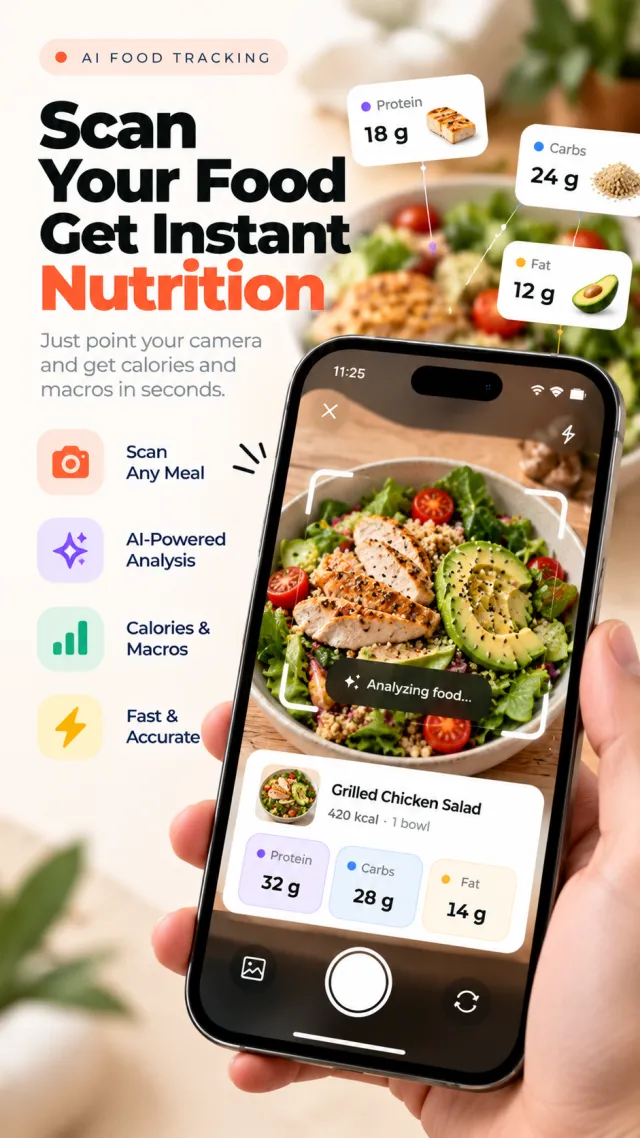
Take or choose a photo of your plate. NutriOne identifies each food and estimates its portion, calories, protein, carbs and fat separately, so a plate of dal, rice and roti is broken into items rather than one lump number. Review and adjust any item before you log it. The free plan includes a set number of AI scans every day, which is enough to make photo logging a habit before deciding whether you need unlimited scans.
Barcode and search for everything else
Packaged food is faster with a barcode. Scan it, or type the number printed under it. If a product isn't in NutriOne's database, it's looked up on Open Food Facts. You can also search the food database, re-log saved and recent foods, and set servings in grams, millilitres or pieces.
Targets built on a real formula
Your daily calorie and macro targets come from your age, sex, height, weight, activity level and goal, using the Mifflin-St Jeor equation. You can see where the number comes from, and change it any time.
Recipes that fit your goals
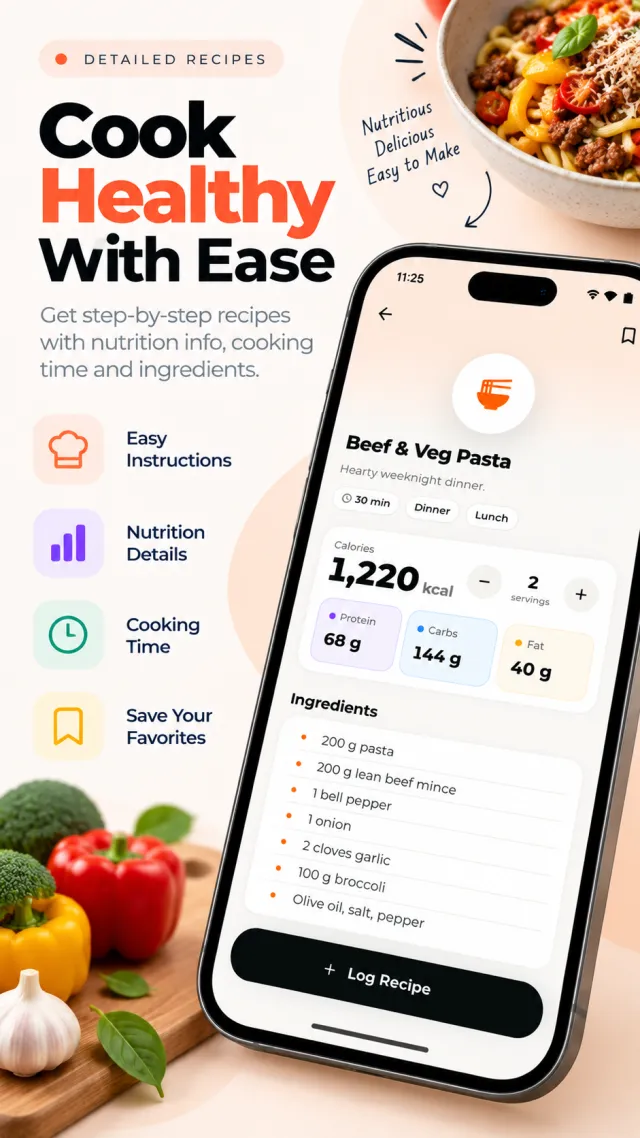
NutriOne suggests healthy recipes picked for your goals, with ingredients, steps, cooking time and nutrition that scales with servings. Cook it, then log it in one tap.
Weight, exercise and insights in one place
- Weight: log it and see your trend from 7 days to a year, with progress toward your goal weight and BMI.
- Exercise: log walking, running, cycling, gym workouts, yoga or your own activities, and optionally add burned calories to your goal.
- Insights: 7, 30 and 90-day views of calories against your target, macro trends, a nutrition score, streaks and achievements.
- Reminders and sync: meal reminders, Health Connect support where available, and your logs sync to your account when you're signed in.
Your food photos aren't kept
A photo is sent securely for analysis only and isn't saved on NutriOne's servers. The original stays on your phone. You can delete your account and its data from inside the app at any time.
When Cal AI is the better choice
- You use an iPhone. NutriOne is on Google Play today. Cal AI is on both iOS and Android.
- You want the established option. Cal AI has a large user base and a longer track record. NutriOne is new.
- You've already paid. If you're mid-subscription and happy, there's no reason to switch until it's time to renew.
Whichever app you use, remember that photo-based numbers are estimates. They're very good for spotting patterns, less good for exact counts, and neither app replaces advice from a doctor or dietitian.
How to get started with NutriOne
- Install NutriOne from Google Play and fill in your profile to get your daily targets.
- Snap your next meal. For the best estimate, shoot from above in good light with the whole plate in frame.
- Check each detected food, adjust portions if needed, and log it.
- Scan barcodes for packaged food, and save the meals you eat often for one-tap logging.
- Log your weight once a week and watch the trend rather than the daily number.
Disclosure: NutriOne is made by MYX, the publisher of this article. Cal AI is a trademark of its respective owner, and MYX is not affiliated with or endorsed by Cal AI. Cal AI's pricing and paywall were checked in October 2026, vary by region and may have changed since, so check its store listing for current details.
NutriOne vs Cal AI: questions
Yes. The free plan includes food logging and a limited number of AI photo scans every day. NutriOne Premium unlocks unlimited AI scanning and more.
AI estimates are a helpful starting point, but portions and hidden ingredients are hard to judge from a photo. Take a clear, well-lit photo from above and adjust the portion before you log it.
Yes. Scan a barcode or type the number under it. If the product isn't in NutriOne's database, it looks it up on Open Food Facts.
No. A photo is sent securely for analysis only and isn't saved on NutriOne's servers. The original stays on your phone.
Yes, NutriOne supports Health Connect on Android where it's available.
No. NutriOne is a general wellness tool for people aged 13 and over. Nutrition values are estimates. Talk to a doctor or dietitian for medical advice.