BillOne vs Vyapar: a simpler GST billing app for small shops
Vyapar is a full billing and accounting suite. BillOne focuses on the everyday essentials: GST invoices, stock, purchases, expenses and profit, on your phone and offline first.
The short answer
Choose Vyapar if you want a mature accounting suite with a Windows desktop app and deep reporting. Choose BillOne if you run a shop or trading business from your phone and want GST billing, inventory, purchases and expenses that work offline and are free to use.
Why businesses look for a Vyapar alternative
Vyapar is one of the most popular billing apps for Indian small businesses, and it has earned that. It covers invoicing, inventory, accounting and reports, runs on Android and Windows desktop, and works offline. Its Android app offers essential features free, with premium features on a yearly plan.
That breadth is exactly why some owners look elsewhere:
- More than they need. A kirana store, hardware shop or small trader mostly needs to bill, track stock and know whether today was profitable. A full accounting suite brings more menus and settings than that.
- Premium features cost extra. If the features you rely on sit in the paid plan, that's a yearly bill to budget for.
- Phone-first work. Many owners never sit at a desktop. They want the whole workflow designed around one screen in one hand.
BillOne vs Vyapar at a glance
| Feature | BillOne | Vyapar |
|---|---|---|
| Focus | Phone-first billing, stock, purchases and expenses | Full billing and accounting suite |
| GST invoices | CGST, SGST, IGST, HSN/SAC, GSTIN | Yes |
| Inventory | SKU, barcode, categories, low-stock tracking | Yes |
| Purchases, suppliers and expenses | Yes | Yes |
| Works offline | Yes, data stored on your phone first | Yes |
| Desktop app | No, phone only | Windows desktop app |
| Reports | Everyday reports: sales, purchases, expenses, estimated profit | Deeper accounting reports |
| Price | Free with ads, optional in-app purchases | Free essentials on Android, premium on a yearly plan |
What BillOne does differently
GST invoices without the setup marathon
Set up your business once, with your GSTIN, address and invoice number sequence, and you're ready to bill. BillOne handles CGST, SGST and IGST, GST rates, HSN and SAC codes, and both GST-inclusive and exclusive pricing. Add discounts, record the customer's GSTIN and share the invoice digitally. Invoice numbering stays reliable even when you're offline.
Payment status you can see at a glance
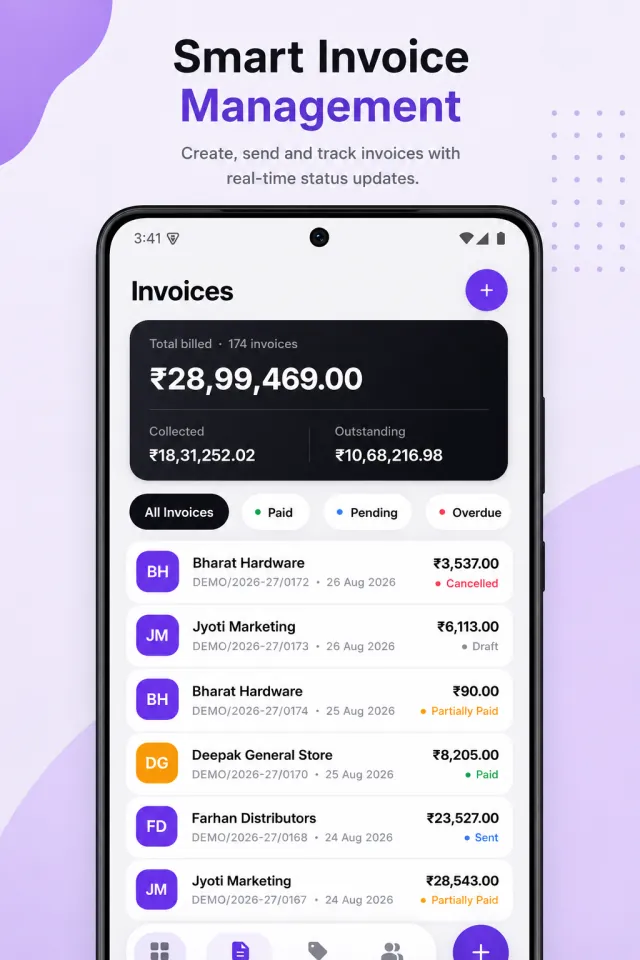
Each invoice is marked paid, partially paid, pending, overdue, sent, draft or cancelled. Filter the list to chase what's outstanding, and see total billed, collected and outstanding at the top.
Stock that updates itself
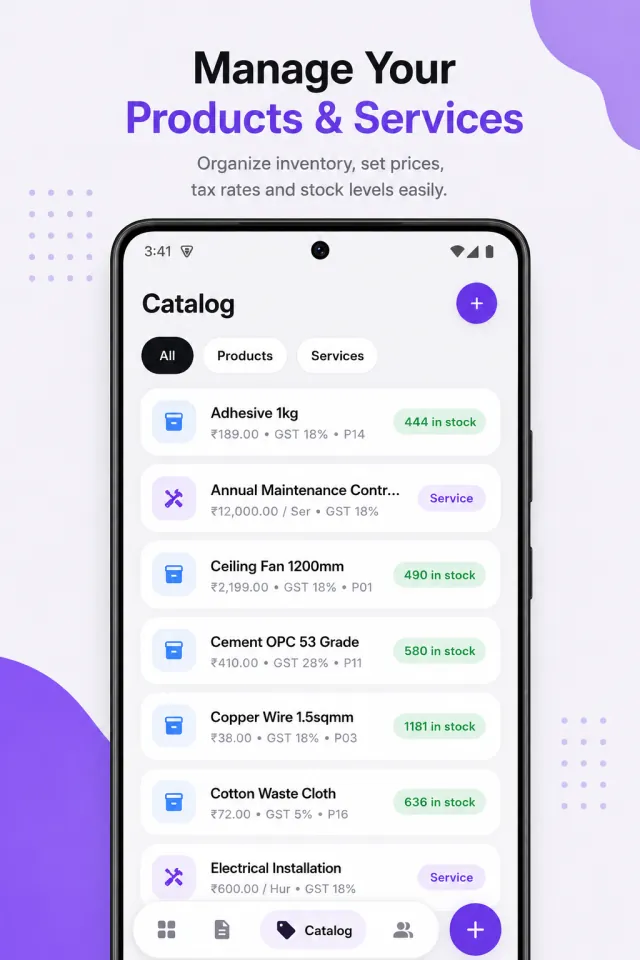
Add products and services with SKU, barcode, category, purchase price, selling price, GST rate and HSN/SAC code. Stock goes up when you record a purchase and down when you make a sale, so the number on screen matches the shelf. Low-stock tracking flags what needs reordering, and stock adjustments and history keep everything traceable.
Purchases, suppliers and expenses
Record purchases against suppliers, track what you still owe, and log everyday costs like rent, electricity, transport and staff. Purchases feed straight into your inventory and reports.
A dashboard that answers "did we make money?"
The home screen shows revenue, outstanding, paid this month, pending and overdue. Reports cover today's sales, purchases, expenses, estimated profit, top-selling products and trends, by day, week or month.
Offline first, sync when you choose
BillOne stores your data on your phone, so billing doesn't stop when the network does. Two-way cloud sync is optional and runs when you choose, keeping records aligned across devices with access scoped to your account. You can manage more than one business in the app, and use it in English or Hindi.
When Vyapar is the better choice
- You work on a computer. Vyapar has a Windows desktop app. BillOne is phone-only.
- Your accountant wants more. If you need full accounting and deeper reports, Vyapar's suite goes further.
- You want a long track record. Vyapar has years of development and a large user base behind it. BillOne is new.
- You need a specific advanced feature. Vyapar offers a long list of advanced features. If your business depends on one, check that BillOne supports it before you switch.
How to switch from Vyapar to BillOne
- Install BillOne and set up your business profile: name, GSTIN, address and invoice number sequence.
- Add your top-selling products first, with GST rate and HSN code. You can add the rest as you bill.
- Enter opening stock for each product.
- Add your regular customers and suppliers.
- Start billing in BillOne from the first day of a new month, so your invoice series and reports start cleanly.
- Keep your old records accessible. GST rules require businesses to keep accounts for several years.
Disclosure: BillOne is made by MYX, the publisher of this article. Vyapar is a trademark of its respective owner, and MYX is not affiliated with or endorsed by Vyapar. Details about Vyapar were checked in October 2026 and may have changed since, so check Vyapar's website for current plans and features. This article isn't tax advice.
BillOne vs Vyapar: questions
Yes. BillOne is free to download and use, with ads. Optional in-app purchases are available.
Yes. BillOne stores your data on your phone first, so you can create invoices and update stock offline. Cloud sync is optional.
Yes. BillOne supports CGST, SGST and IGST, GST rates, HSN and SAC codes, GST-inclusive and exclusive pricing, and customer and business GSTINs.
Yes. BillOne supports multiple businesses, each with its own profile, invoice number sequence, customers and records.
Yes. BillOne is available in English and Hindi.
There's no direct import. Most businesses add their regular products and customers, enter opening stock, and start BillOne at the beginning of a new month so invoice numbering stays clean.